You need a desktop browser with Phantom or another supported Solana wallet, enough SOL for the costs shown in your launch review, and your token’s name, symbol, description and image.
Creating a token uses real SOL. An optional first purchase is separate from creation and network costs. Creating a token does not guarantee buyers, trading activity, rewards or profit.
01
Install and set up Phantom
Phantom is a wallet extension for your browser. It lets you hold SOL and tokens, connect to CreateSol and approve transactions.
Open the Phantom installation link below and add the extension to your browser.
Follow Phantom’s instructions to create a wallet or use your existing wallet.
Keep your recovery phrase and private keys secure. Never enter them on CreateSol or share them with support.
Add SOL to your wallet using a method available in your wallet or a service you trust. Check the receiving address carefully.
You need SOL even if you skip the first purchase. The launch review shows the required costs; keep some extra SOL for network fees.
Open Launch token, click Connect wallet, select Phantom and approve the connection in your wallet. If Phantom does not appear, enable the extension, unlock it and refresh this page.
Connecting shares your public address. It does not give CreateSol automatic access to spend your funds. Each transaction needs your approval.
Choose your creator wallet carefully.
Tokens bought during creation go to this wallet, and creator rewards belong to this original creator wallet. To see your purchased tokens in Axiom, Fomo, Pump.fun or another service, its trading wallet must use the same public address. Connecting a different address will not move your tokens.
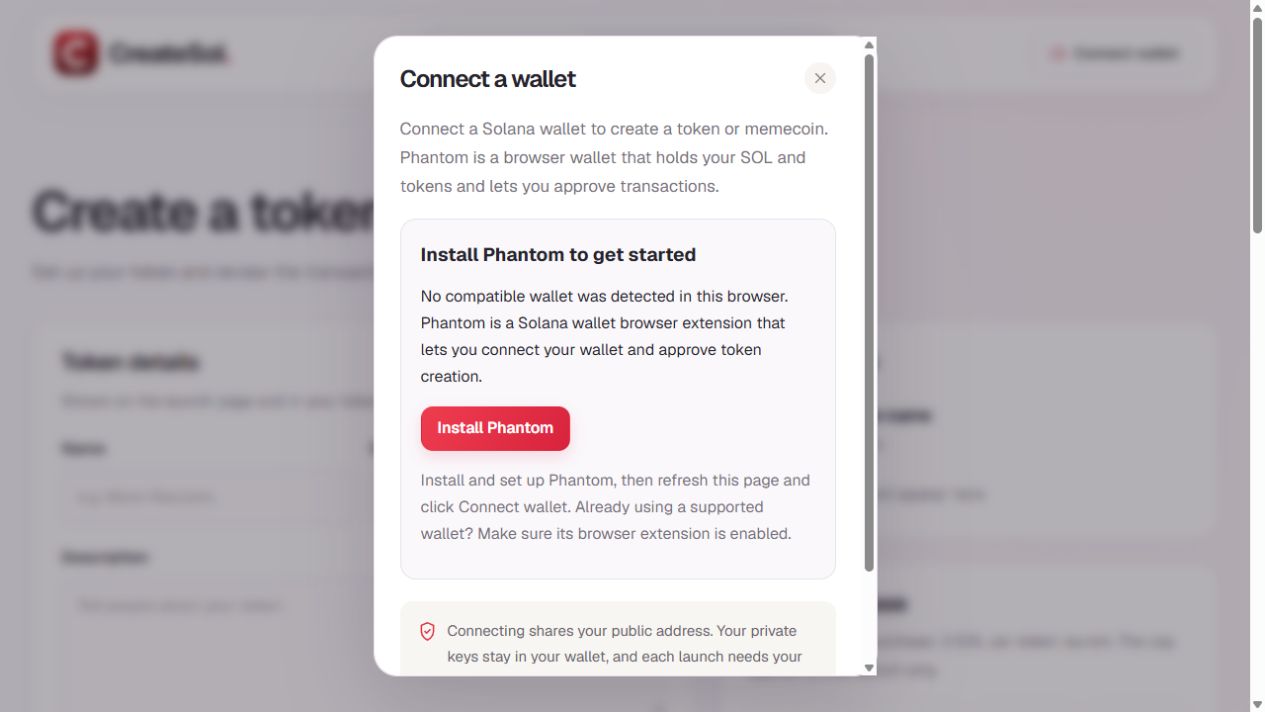
What you see when no supported wallet is detected. Click the image to enlarge it.
03
Add your token’s name, symbol and image
Enter a name people will recognize, a short symbol such as MOON, and a description explaining your idea. Upload a PNG, JPEG, WebP or GIF image up to 4 MB. A clear square image works well.
The Live preview updates as you type. Check spelling and use an image you have permission to publish. Token names and symbols are not unique; the token address identifies your token.
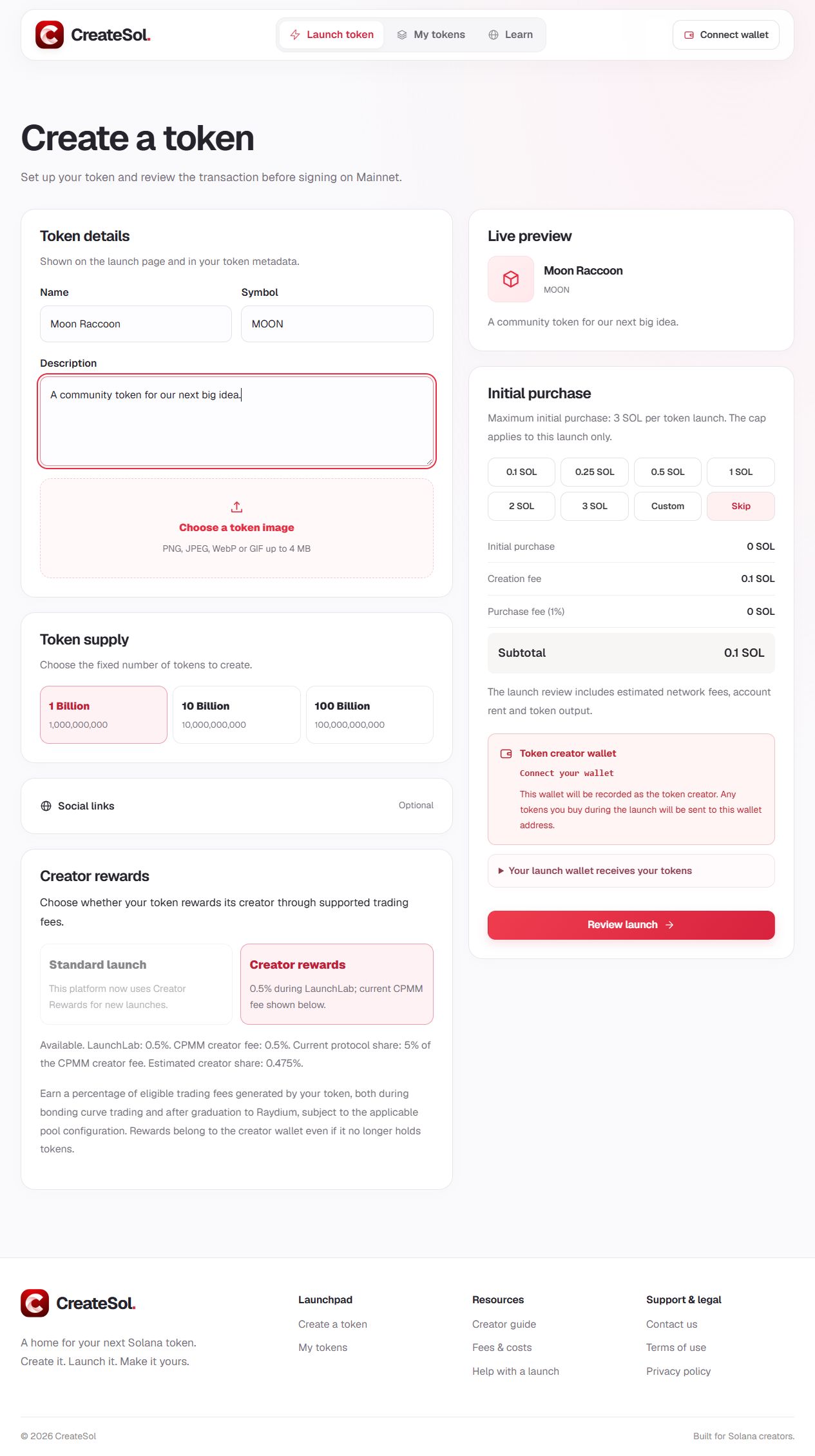
Example form only. No token was created for this screenshot. Fees and availability can change; use the values in your current review.
04
Choose a supply and add your links
Select 1 billion, 10 billion or 100 billion as your token’s fixed total supply. A larger supply does not automatically give your token a higher value.
Open Social links to add your website, X / Twitter, Telegram or Discord. These are optional. Use complete HTTPS links and check that they open the correct pages.
05
Check Creator Rewards
The form shows whether Creator Rewards is available or required for the current launch configuration. Read the percentages displayed before continuing.
With the current supported configuration, eligible LaunchLab trades generate a 0.5% creator fee. After graduation to Raydium CPMM, the creator fee is 0.5% gross; the protocol currently retains 5% of that fee, leaving an estimated 0.475% of eligible volume for the creator before claiming costs.
Rewards belong to the original creator wallet even if it no longer holds tokens. They depend on actual eligible trading, and no trading activity or earnings are guaranteed.
If you want to buy some of your token during creation, choose an amount or select Custom and enter SOL. Follow the minimum and maximum displayed in the form. Choose Skip if the first purchase is optional and you do not want to buy.
There is no free creator token allocation. Tokens you buy go to the connected creator wallet. Skipping the purchase means you do not receive purchased tokens, but you still pay the applicable launch and network costs.
Check the purchase amount, creation fee and purchase fee in the summary. The subtotal is not the complete network cost; the review also includes estimated transaction fees and account setup costs.
07
Review, approve and wait for confirmation
Click Review launch after completing the required fields.
Check the creator wallet, token details, supply, reward settings, costs and estimated tokens from your first purchase.
If the details are correct, click Sign and launch.
Read the request in Phantom and approve only if you agree with it. You can reject it before submission.
Wait for CreateSol to confirm the result. Use the transaction link to check its status.
If something goes wrong
For insufficient funds, add enough SOL for the complete review amount. If a review expires, prepare a new review. If a transaction has already been sent, check its status before trying again to avoid a duplicate launch.
Confirmed blockchain actions cannot simply be undone. Creation fees are non-refundable after a successful finalized launch, subject to applicable legal rights. Read the terms before approving.
08
Find your token and claim eligible rewards
After confirmation, open your token page or My tokens with the same creator wallet. Copy the token address to identify and share it. Your wallet address and token address are different.
External trading services may take time to index a new token, and each service decides which tokens it shows. A launch does not guarantee a listing everywhere or that anyone will buy.
When you have rewards to claim
Connect the original creator wallet and open My tokens.
Search for your token or click its image or name to open its details.
Check the available rewards, then use Claim Rewards or Claim All Rewards when eligible.
Review and approve the claim in your wallet, then wait for confirmation.
The minimum is currently $0.50 in eligible rewards per claim transaction. You also need SOL for transaction costs. Rewards are paid in their actual token denomination, which may include WSOL. WSOL is wrapped SOL; a claim does not automatically convert it to ordinary SOL.
Promote your token responsibly and help users understand its risks. Trading tokens can result in losing all the money spent. Do your own research before creating or buying.
Ready to create your token?
Keep this guide open while completing the launch form.